
pureikyubu 2.0 — Release Notes
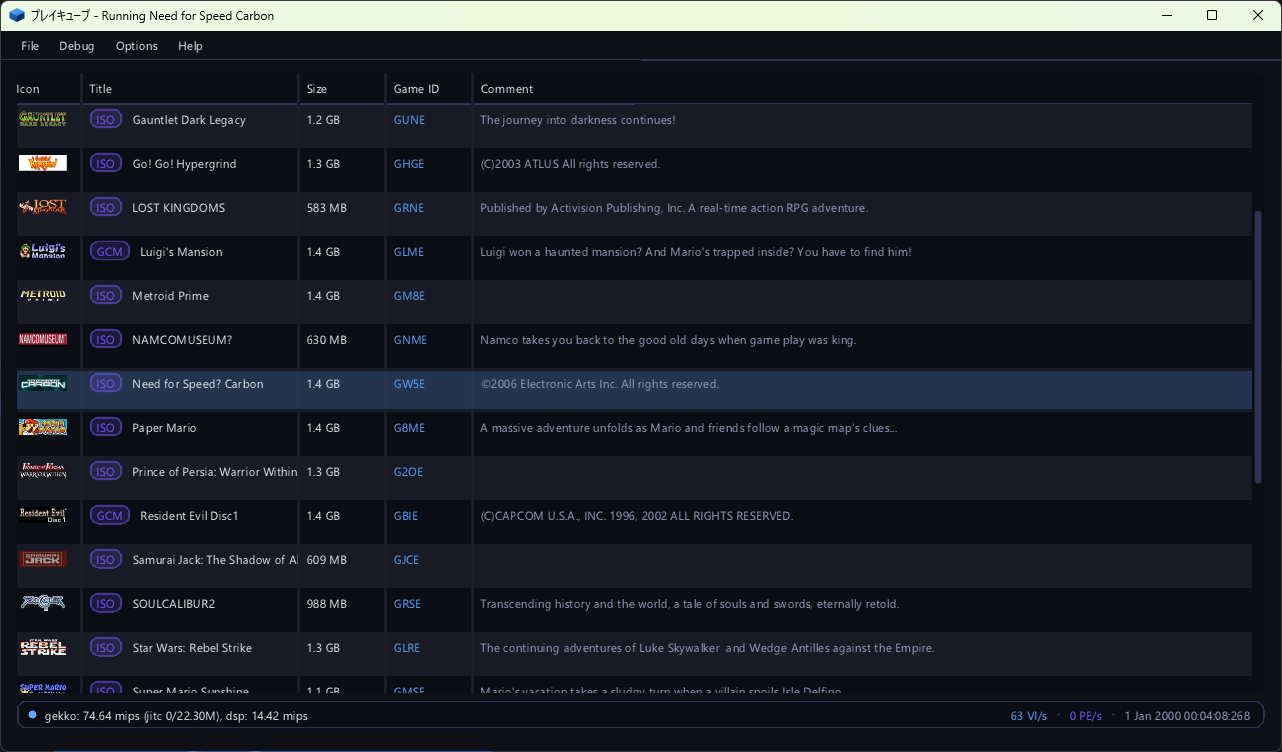
Version 2.0 is the peripheral release the 1.9.1 notes promised. The console's peripherals are one subsystem now: every device — a controller, a memory card, a network adapter, a Game Boy Player, a Game Boy Advance on a link cable — is a model of its own, with its own settings, its own place in the configuration and one window that edits them all. The Broadband Adapter and the Modem Adapter are emulated end to end from the console's side, the Game Boy Player is reached through the ARAM window it really lives in, and the memory card finally mounts. Save states arrive for the GameCube side, with the portable machines keeping theirs. The software GFX pipeline leaves its experimental status: it draws the boot ROM's splash and the movie players, and the titles it runs agree with the shader backend. The interface gets eight themes, the Japanese titles of the selector, text that is one texel to one pixel at any display scale, a video output window that follows the window it is in, and a status bar that reports the two clocks of the emulation. Need for Speed: Carbon, whose VM abort started this line of work, boots.
On this page
Highlights
- One pool of peripheral devices. The emulation of a peripheral used to be
wherever its consumer happened to be:
si.cppknew the controller's answer bytes,padsdl.cppknew both the SDL side and the way a pad is polled,memcard.cppmixed the card format with the EXI lifecycle, and a device's settings were kept by whoever used the device. A peripheral is a device of its own now (src/peripherals.cpp): a model registered by its module (cont.cpp,memcard.cpp,gbplayer.cpp,gbalink.cpp,bba.cpp,mdm.cpp), a port of the console's SI, EXI or Hi-Speed bus, a pool that is theDeviceslist of the configuration, and a property grid the settings window draws from what the device publishes. A build that does not compile a module simply has no such devices, and a new model appears in the settings window without a line of front end code. - The two network adapters. The Broadband Adapter (DOL-015) and the Modem
Adapter (DOL-012) share serial port 1 (EXI channel 0, chip select 2) and are
told apart by their EXI device ID. Both speak the console's own command word, then
data protocol — an EXI shim in front of an off-the-shelf Ethernet controller, with
the address walking forward with every byte — and both answer the bring-up the SDK's ethernet
library performs. The Broadband Adapter's frames go through a
BbaBackend, and the backend the builds ship puts them on UDP, so two emulators play on one emulated segment. The network support is still a work in progress: no title in the SDK speaks IP, the challenge/response handshake and the split length field are models, and with an empty peer the adapter is a console whose cable is unplugged. - The memory card mounts. Five things were wrong before a title could use a
card, and each was invisible until a real program tried: the command decoder came up
un-parked, the EXI device ID was shifted into the wrong byte, "erase card" was missing its two
trailing bytes, an address past the part's capacity was refused instead of wrapping, and a read
restarted from the command's address on every transfer instead of streaming on. With those and
the card's unlock challenge, all six capacities were verified end to
end — 4, 8, 16, 32, 64 and 128 Mbit — with
CARDFormat,CARDMountandCARDCheckreturning what the hardware returns. - The Game Boy Player is reached where it really is. The Player does not
appear on EXI or SI: it hangs off the ARAM (SDRAM) controller, and the
Start-up Disc talks to it by claiming an expansion window at
0x0100_0000and then running a four-round complement handshake that a plain memory window cannot pass.gbplayer.cppimplements the window, theAMCRexpansion size, the 32-byte command channels and PI interrupt bit 13, and once the channels hold their writes the disc stops spinning and reaches***Creating GbpSystemObject. The GBA support is still a work in progress: the Player's own firmware is not implemented, no frame stream is ever read, and the link cable speaks only the JOY protocol — not the multi-boot upload that puts a program into a Game Boy Advance. - Save states. The GameCube side gets the format the portable machines have
had since
src/gba/gba_savestate.*: the whole machine in one file,F5to write andF7to read the current slot,Shift+F5/F7 to step it, the same items in the File menu, andsavestate,loadstateandstatesin the debug interface. A state is a header, a checksum and one section per subsystem, about 45 MB (51 MB with the software pipeline, which also carries its EFB). The round trip was checked byte for byte, and so was the property that matters: a state loaded into a machine that has run on resumes the run that never stopped. - The software GFX pipeline is no longer experimental. It renders the
boot ROM's splash (the 592-pixel picture the VI fetches with
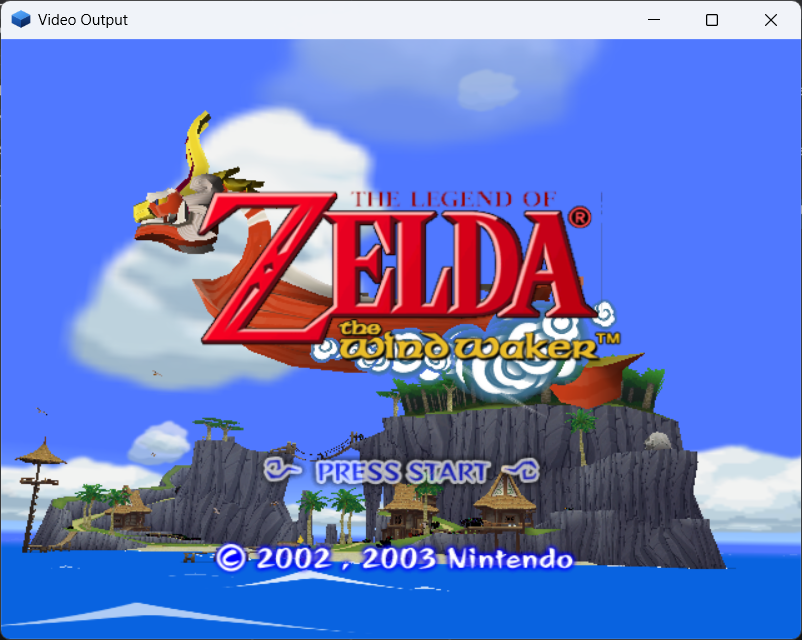
VI_PICTURE_CFG's own width and the horizontal scaler) and the movie players — the Wind Waker title screen above is its work — and the DolphinSDK demo sweep agrees with the shader backend, which remains the default. The fix that let the picture out was the CP's BP write mask (0xFE): every bypass register merges the mask into its own value for the very next write, which keeps the GX library's shared payloads from clobbering each other. - The GFX command dump.
gfxdumprecords what the CP pushes into the XF, keeps the last frames as a ring, and shows the stream in three ways: the decoded commands, the raw big-endian words and the guest-RAM slices of the textures the frame sampled. It is a debugger tab of its own (GFX Dump) and a command of the debug interface. - The interface has a look of its own. Eight themes drawn from the site's palette (the default "Flipper", the six hues next to it and "Daylight" for the light one), the Japanese titles of the selector merged into the font, text baked at the display scale so that a glyph lands on one pixel at any scaling, the video output window resized and titled with its backend and frame rate, and a status bar that reports the two clocks of the emulation: the console's time base and the host's wall clock.
- Need for Speed: Carbon boots. Its VM abort was a TLB that was not flushed when a DSI/ISI page fault was taken, so the guest kept executing through a stale translation; the PTE's Changed bit is now set through the translation cache as the hardware sets it.
Added
The peripheral pool
- What a device is, in one number.
DeviceIDnames a model:0x00010001is the standard controller (DOL-003),0x00020001a memory card,0x00030001the Game Boy Player. A module registers its models (Peripherals::RegisterFactory), so the subsystem itself does not know what a pad or a card is; a port belongs to a bus (SI, EXI or HSP), and a device can only be plugged into a socket of its own bus. The ports are the four SI channels, the two card slots, serial port 1 and the Hi-Speed Port. - A device publishes its controls and its properties. An actuator is
one control (
PAD_ACT_*for a pad,GBP_ACT_*for a Game Pak), a binding is what drives it (a keyboard key and a host controller button or axis), and properties are everything else a device shows about itself: a checkbox, a read-only line, a file it owns (PERIPH_PROP_FILE) or one it only reads (PERIPH_PROP_ROM). The kind picks the editor and the browser. - The host side is a back end, not a part of a device.
HostInputis implemented by the front end (padsdl.cpp,padnull.cpp) and by the unit tests; the rumble motor reaches the host controller through it. A device never makes an SDL call and the front end never knows what a pad is. - The pool is a list, not a table with holes. A device keeps its entry of
the list, so taking a device out takes its settings with it and the entries that follow
are not renumbered. The list is the content; there is no fallback in the code for "a slot the
configuration does not mention". The settings of the builds before the pool
(
controllers,memcardsand theDevice3_Namevariables) are dropped from the document when the settings are read."peripherals": { "Devices": [ { "Type": 65537, "Name": "Controller 1", "Port": 0, "VKEY_FOR_A": 27, "GCKEY_FOR_A": 65536 }, { "Type": 131073, "Name": "Memory Card A", "File": "Data/card.mci" } ] } - The lifetime. The pool is opened with the emulator, not with the machine —
the settings window edits it with no game loaded — and the machine only matters to a device
that talks to it:
MachineOpenedputs the cards into their slots andMachineClosedtakes them out and flushes the files they were writing. A device is never destroyed while the emulator runs: one that is removed is detached, taken out of the list, and kept alive until the pool is closed in one piece. testing/peripherals_test.cppdrives a pad the way a user does and covers the pool, the buses, the motor, the origins, and that an added device is still there after a restart.
The two network adapters
- The transport. Both adapters front an off-the-shelf chip with an EXI
shim, and a selection is a command word followed by the data, most significant byte
first, with the address walking forward with every byte — which is how the driver reads six
MAC bytes or a packet in one burst:
The shim's register is six bits and the controller's address sixteen; the register file is page 0 and the packet memory is the pages above it. The device is told which transfer begins a sequence (the channel'saccess command word then controller read four bytes: 0x8000and the address in bits 15:8an n-byte readcontroller write four bytes: 0xC000and the addressan n-byte writeshim read two bytes: reg << 8an n-byte readshim write two bytes: 0x4000 | reg << 8an n-byte writefirstImmflag), because a two-byte write can be either a command or a byte of data. - The Broadband Adapter (DOL-015). The controller's register file, its
identification, its MAC address and its receive/transmit ring are emulated; the network behind
it is a
BbaBackendthe front end installs.bbaudp.cppputs frames on UDP: the "GCN Hardware" page names the other end (BBA_PEER, ahost:port) and the port this emulator listens on (BBA_PORT). An empty peer is the default and means "no network" — the adapter then identifies itself, reports the link down and no frame arrives. - The Modem Adapter (DOL-012). The same command-then-data protocol with a
six-bit register number of its own page:
0x01is the status the driver polls,0x0Dthe error status,0x12the raw status, and0x06/0x07,0x0E/0x0F,0x10/0x11are the divisor and threshold pairs. The register file, the identification, the acknowledge commands and the AT interface are emulated; the telephone line is not — the setup commands are answeredOKand a dial is answeredNO DIALTONE. - The command word is keyed on the assertion, not on a change. The flag that marks the first transfer after a chip select used to be set only when the selected device changed, and a driver handed a bus on which the socket is already selected begins its sequence with a select that changes nothing — its command word was taken for data. The flag is now set by every write that asserts a select; three runs out of three of the modem replay driver now read the identification back.
- How the two are checked without a game. No SDK demo speaks IP, so what is
checked is the half of the driver that lives on the console's side — the bring-up the ethernet
library performs before any packet moves (
bbadrv.py/mdmdrv.pyload that sequence into a booted demo). Both adapters answer it, and they answer differently:The driver reads Broadband Adapter Modem Adapter the EXI device type 0x040202000x02020000the controller id at 0x444D 58("MX")0x00020000the MAC burst a MAC ( 00 09 BF 00 00 01)the adapter's own id the link state at 0x310300MISC2 ( 0x50) written0x80, read back8000the shim revision written 0xD107, read backD1D1the challenge burst 5A 5A A5 A500 00 00 00
The Game Boy Player and the link cable
- The Player is an ARAM expansion, not a device on a bus.
AMCRcarries both the internal and the expansion size; the driver claims the largest window (0x0063), probes it with a four-round handshake that requires byte 1 of the answer to be the complement of the byte written, and settles on 16 MB (0x005B). The window's base is the internal ARAM size — all Player traffic is at ARAM0x0100_0000and upwards — and it is a window of registers and mailboxes, not of memory. - The channels hold their writes. The console's command routine is a
read-modify-write: it reads a byte, clears the bits it is acknowledging and sets the bits of
the command it sends, and writes the result back. A device that answered a constant could
never be acknowledged, and the disc spent a 20-second run on ~107 000 reads of
+0x400000and ~53 000 of+0xD00000. With the channels holding their writes and the interrupt raised only when the device changes state, the same run makes 526 and 3 reads, and the disc gets on with its bring-up. - What the disc does now. With the port brought up to that point the Start-up
Disc prints
***Creating GbpSystemObject,***Allocating GbpSystemObject,***Creating Display objectandGBAPadInit : ClientImageSize = 19464— the port bring-up is past the point it used to be stuck at. - The Game Pak is a property of the device. The cartridge file is kept in the Player's own entry of the pool ("GamePak"), the settings window draws a "Game Pak" row with a file browser on it, and the device carries the "BIOS" row as well. A "Run Game Pak" switch decides whether the machine inside the Player costs anything at all: a Game Pak that is running costs about as much host time as the console it is attached to.
- Watching the Game Pak run. A GameCube session publishes no GBA debug
interface of its own, so the device publishes
gbpshot <file.png>: the 240x160 LCD of the machine in the Player (or of the one on the link cable), written to a file, with the device's name, the size and the machine's frame counter in the answer. - The link cable (
gbalink.cpp) is the same machine behind the DOL-011 JOY command set, and it runs only when it has something to do: a Game Pak in the bay, or the console driving the port as a link — the second case is what a multi-boot needs, because a title that streams its program into the partner's RAM does it with an empty bay. The device says so in the log once:GBA Link: the console drives the port as a link (command 15). It does not speak the transfer that uploads a program into a Game Boy Advance.
Save states
- The keys and the menu.
F5writes the state of the current slot andF7reads it back;Shift+F5/F7 step the slot (0..9, wrapping, shown in the status bar). The File menu carries Quick Save/Load State, a submenu per slot with the current one marked, and Next/Previous State Slot. - The commands.
savestate [slot],loadstate [slot]andstates, each answering Markdown next to the fields a client can use (file,slot,result,error/size). The machine is stopped for the duration of a save or a load and started again the way it was. - The files. A state lives next to the image and is named after it:
Data/game.isogivesData/game.st0...st9,pong.dolgivespong.st0.., the boot ROM givesBootrom.st0... - The format. A header (the magic
PSAVEST, the format version, the payload size and its FNV-1a 64 checksum) and then one section per subsystem:META,FLPR,CPU,MEM,PI,VI,AI,DI,SI,EXI,CP,DSP,DVD,GX,PE,XF,SU,RAS,TEV,TX,BPandHLE. A section is a tag, a length and the bytes; the reader walks them in order and steps over a tag it does not know, and every section has to be consumed exactly to its end. - What a state does not carry, and each has its reason: the disc image, the executables, the boot ROM and the DSP ROMs; the memory cards and the rest of the pool; the samples already handed to the audio device; the EFB of the shader pipeline; the GL objects, the window and the host threads; the JIT's compiled blocks; the debugger's breakpoints; and the caches (written back and dropped, except the locked L1 data cache, which is scratch-pad memory and travels in the state).
- A state that does not belong is refused by name — not a state, an unknown format version, a checksum that does not match, another game, another amount of memory, another build's section layout, the other machine's state, or an empty slot.
- The checks it was written from. A headless build driven through the MCP
transport wrote a state, read it back and wrote it again — byte for byte identical, on
pong.doland on the boot ROM with the software pipeline live. A machine stepped 20 000 instructions after loading a state produces the same bytes as one that never stopped, and the same holds when the state is loaded into a machine that ran free for five seconds. The tests found two real asymmetries and one cache problem before they passed. - The portable machines keep theirs. Both GBA and Game Boy machines write and
read a state with
F3/F4andShift+F3/F4 (the slot is shown in the window title), the cartridge's.savis stillF5, and the debug interface hasgbasavestate/gbaloadstate/gbastatesand the Game Boy'sgbsavestate/gbloadstate/gbstates. A state carries the cartridge's identity and is refused by a machine running another one — or by the other machine entirely.
The GFX command dump
src/gfxdump.cpprecords the graphics stream where the XF starts (the CP's own VCD/VAT state is not part of it), as four kinds of record: an XF register block load, an XF register read, a bypass register word with the BP write mask that preceded it, and a draw command with the vertex rows that followed it.- The dump is cut into frames by the frame counter and kept as a ring
(
GfxDump::MaxFrames); a frame past the byte limit is cut off and marked truncated. The stream is a self-describing sequence of big-endian 32-bit words, so a saved file does not depend on the host's word order or on a struct layout. - The RAM slices make a dump self-contained. A draw samples a texture (and, for a paletted one, a TLUT) programmed long before it, and the guest overwrites that texture in the next frame; the texture engine hands every such read to the dump and the bytes are copied into the frame that needed them.
- The commands are
gfxdump [frames],gfxdump commands [id],gfxdump hex [id],gfxdump capture [on|off|toggle],gfxdump select <id>,gfxdump clearandgfxdump save [id]. The debugger has a GFX Dump tab next to the whole debugger, with a tab per answer ("Frames", "Commands", "Hex"), a capture button and a per-frame listing where every field is printed. - The CP also handles the
0x69bypass command now, which is one of the commands a bypass stream can carry.
The interface
- Eight themes. The look is a module of its own (
uitheme.cpp): a palette of ten colours turned into the ImGui style, with the hovered and held states derived from the resting one. The default theme, "Flipper", is the dark ink of the project's site with the blue of the cube of its logo for everything that is selected and the violet of its shaded face as the second accent; six themes next to it are hues of the same recipe (Nebula, Emerald, Crimson, Amber, Graphite, Sakura) and "Daylight" is the recipe over a light background. A theme is picked in Options → Settings… → Interface, shown before it is applied, and kept inui.THEME. - The interface mark. The pureikyubu cube of the project's logo is drawn from
the palette (
UiThemeDrawCube), so the interface is marked by the project and not only coloured like it. - Japanese titles. The selector's Title and Comment columns came out blank for every Japanese disc, because neither ImGui's built-in font nor the proportional faces of the systems have a kana or a kanji in them. Japanese is merged into the interface font from the CJK face each system has (Meiryo, Yu Gothic, MS Gothic, BIZ UDGothic and Arial Unicode on Windows; Noto CJK, VL Gothic, IPA, Takao and Droid Sans Fallback on Linux) over the 2999 ideographs of the Joyo and Jinmeiyo sets; a system without such a face shows the titles the way it did before.
- Sharp text at any scale. The font atlas is baked at the display's own scale (1.0, 1.25, 1.5) while the interface keeps laying itself out at the logical one, so a glyph lands on the framebuffer one texel to one pixel instead of being a smaller texture stretched by the renderer.
- The video output window (issue #458). It can be resized and maximized now: both presenters scale the picture into the largest rectangle of the window that has the picture's shape, centred, with the bands around it black — a maximised 16:9 window no longer turns the cubes of a game into bricks. The software back end scales on the CPU, one pixel at a time; the GL back end blits with the linear filter and clears the bands with the whole colour mask. The software path used to stop updating altogether on a resize, because SDL throws the window surface away and it was never asked for again.
- The window titles and the clocks (issue #458). The video output window says
which backend draws the picture and how many frames a second the emulator outputs
(
Video Output | shader | 59.9 fps); the main window keeps the plain name of what runs. Exactly one of the two counts a frame. The status bar shows the emulated Gekko and DSP throughput and the two clocks of the emulation measured from the moment the image was loaded: the console's time base (TBR 5m 09s) and the host's own clock (wall 1h 02m 03s). The emulated clock is a newOSSecondscommand, becauseOSTime/OSDateTimeroll their hours over at 24. - The settings window (and the stand-alone GBA). Every setting of the
emulator is in one window with a strip of tabs on the left — General (the game selector), GCN
Hardware, Controllers, Memory Cards, Network, High-Speed Port and Interface — and a property
grid on the right. The portable machine is configured in a window of its own,
Options → Stand-alone GBA… (
uisettingsgba.cpp), which edits the machine's file and its eleven bindings; the default keys follow the hardware, where A is to the right of B (AisX,BisZ). - The selector's menu is disabled, and veiled with the reason, while the emulation runs, so a
stray key or click can no longer load another image over the running one. Hardware →
Graphics backend picks the shader or the software pipeline (the same switch as
gxpipeline), and Debug → HW Profiler Overlay switches the profiler's overlay, which now follows the picture into the rectangle the picture took in the window.
Changed
The memory card, reviewed
- The command decoder has to start idle (
0xFF). The device came up with the field zeroed, read every byte of its first write as an extra, never decoded a command and answered nothing — which the console's library sees as "no card in this slot".MCConnectnow parks the decoder. - The EXI device ID is not the card ID. The 32-bit type
(
EXI_MEMORY_CARD_59=0x00000004and so on) is read with a four-byte immediate transfer, most significant byte first, so the capacity code lives in the low byte; the module shifted it into the top byte. The two-byte card ID and the one-byte status are shifted, which is what hid the mistake. - "Erase card" is three bytes (
0xF4 0x00 0x00). The table gave it no trailing bytes, so the two zeros were refused as extras — and the refusal usedHalt, which raised a front-end report on every retry and cost about 80x on the demo that does it. - The card wraps its addresses. A flash part is smaller than the address its controller can put on the bus, so a transfer at an address the part does not have is the same bytes as the wrapped address. The library reads at addresses that only exist on larger parts while it identifies the card. Reads, writes and sector erases now wrap.
- A read streams from an internal address. The four offset bytes a read carries are where the block starts, and every transfer continues where the last one stopped; only a new command word resets the counter. The module re-read the command's address on every transfer, so the library's mount read the card's first four bytes nine times.
- The unlock challenge. An original card does not hand its code over to anyone
who asks: the library hides a challenge in the read command's spare fields (a 20-bit value and
a length of 4..32 from a generator seeded by the tick counter), works out the answer with a
bit-serial mixing step, reads the card's code with the answer walking on between the words, and
requires bit 6 of the status byte.
memcard.cppimplements the whole exchange; the four details that make it work are that the code read comes from the controller and not the flash, that bit0x40is set only by a challenge, that a challenge is an immediate transfer and never a page read, and that a challenge can be exactly four bytes long.
The settings window is one window
- The dialogs the pool replaced — Options → Controllers → Port n, Options → Memcards → Slot A and the settings that had no dialog at all — are gone from the menu, which carries a single Options → Settings… item.
- A page follows the device, not the bus it hangs from. The cards and the two network adapters are all EXI devices of the pool, so a page that took its devices from the bus showed the adapters under "Memory Cards".
- A setting takes effect as it is edited (a binding is used by the next poll, a card file is opened at once) and the pool writes the device back itself, so the window has neither an OK nor a Cancel.
The software pipeline
- The boot ROM's splash is drawn. The number of active lines comes from
VI_VERT_TIMINGand the geometry of a line fromVI_PICTURE_CFG— itsWPLfield is the width of the picture in 16-pixel words and itsSTDfield is the stride a field's lines are fetched with. The splash is 592 pixels wide (37 words, 1184 bytes to a line) and the picture came out skewed while the scanout assumed the 640 pixels of the render target.VI_HSCALEthen decides whether the horizontal scaler spreads the picture over the whole line (the boot ROM enables it) or leaves it one pixel to one pixel. - The movie players run. The software pipeline draws the movie players' output, which is what put the Wind Waker title screen on the screen above.
- The BP write mask (
0xFE) limits which bits of the very next BP register write are updated and then clears itself. Every bypass register honours it now, and the CP hands it down the bypass chain with the write. Without it the library's blend write took the colour and alpha update bits ofCMODE0away, and everything drawn after it wrote no colour at all — the black sky of The Wind Waker. - The software EFB is cleared with the first primitive of its frame, which is what a frame that begins with a full-screen primitive needs. A bypass register that honours the write mask also no longer clobbers the bits another feature owns.
Gekko, the command processor and the serial interface
- TLB flush on a page fault. The cache-management instructions that fill the TLB can leave a stale translation behind, and the guest kept executing through it after a DSI/ISI page fault — Need for Speed: Carbon's VM abort. The TLB is flushed when such a fault is taken.
- The PTE's Changed bit is set through the translation cache, as the hardware sets it. Before, the bit was only written when the TLB entry was filled, so a page that was written through a cached translation never reported that it had been changed.
WPAR[BNE]is reported only when half of the write gather buffer is occupied, which is the condition the hardware reports it under (an experiment that the benchmarks now measure).- The CP handles the
0x69bypass command. - Issue #416: deterministic stepping. The
stepcommand, the IPL's "no disc" path (--no-disc) and the display XFB reporting were made deterministic and repeatable, so a run can be stopped at an exact instruction and compared. - The serial interface answers a COM transfer to an empty socket the way the
hardware does, and latches
NOREP— a channel that answered a communication transfer with no reply must keep saying so.
The portable core
- A parked DMA keeps its place in the block it is repeating. GBATEK reloads
CNT_Land optionallyDADon a repeat, notSAD, so the source pointer carries on; a sound DMA is always repeating, and the old code restarted the stream at the same address on every FIFO refill. - A byte store to
DISPSTATkeeps the half it does not address, which is what a game that writes one byte of the register expects. - The GBA settings get a window of their own, the BIOS row's buttons have their room and the file is a user file rather than a shipped one.
- The two Game Boy devices share the controls and the settings and differ only in which bus the console reaches them by.
Fixed
- The black sky of The Legend of Zelda: The Wind Waker's title screen — the CP's BP write mask (see Changed), which made the picture of a title that begins with a blend-mode write go dark.
- Need for Speed: Carbon — the stale TLB translation after a DSI/ISI page fault and the PTE Changed bit (see Changed). The title boots and runs.
- The memory card could not be mounted — five separate defects (see Changed), each of which made the console's own card library refuse the card.
- A JSON list is replaced as a whole instead of merged member by member; the elements of a list have no name, so a merge could only go by position and folded every entry of the file into the first one. The bug was reachable as soon as the pool became a list.
- The Game Boy Player's status byte had no return on its default path, so every status read the Start-up Disc made was whatever the return register happened to hold; the whole status block is decided now.
- The ARAM DMA engine logged every block it moved, unconditionally. A Player
disc that polls its window moves tens of thousands of blocks a second and every one of them
cost two lines of text; the block honours an
AR_LOGsetting now, off by default. That one change is worth about 4x on a run of the Start-up Disc. - The GFX dump's frame counter and the presented-frame counter of the copy engine are pinned by tests: a texture copy and a partial display copy do not count, a full-frame display copy does.
Known issues
- The network support is a work in progress. The adapter's own half is
emulated (the transport, the registers, the identification, the MAC and the rings), but the
network behind it is a backend, and no title in the SDK speaks IP: ARP, IP
and the sockets the SDK's library builds on them are unproven. The challenge/response handshake
and the split length field of a received packet's descriptor are models rather than
reconstructions, and they are marked as such in the source. The Modem
Adapter's telephone line is not emulated — the setup commands are answered
OKand a dial is answeredNO DIALTONE, which is the result code a modem with nothing in its socket reports. With an emptyBBA_PEERthe adapter is a console whose cable is unplugged. - The GBA support is a work in progress. The Game Boy Player's own firmware is not implemented: the port's window, the handshake, the channels and the interrupt are there and the Start-up Disc is past its bring-up, but every command the console sends is answered by the Player's firmware and nothing implements it, so no frame stream is ever read and the frame buffer the VI scans out stays empty. The link cable speaks only the JOY protocol a Game Pak runs from its own cartridge; it does not speak the multi-boot transfer that uploads a program into a Game Boy Advance, which is what the Start-up Disc's own 19 464-byte client image needs. A Game Pak running inside a Player or a link device is not part of a GameCube save state either: a state loaded with a Game Boy game in progress resumes with that machine at its reset.
- The portable machines keep the issues of 1.9.1. The Game Boy Color's picture
is still work in progress (a line is composed at once rather than dot by dot); the GBA's
per-line OBJ cycle budget and
DISPCNTbit 5 are not modelled and the video-memory contention cycle is missing; the sound output stage (SOUNDBIAS, the PWM amplitude) is not modelled; the HLE sound driver's reverb is not modelled; Nintendo's aging cartridge is not fully green (the remaining checks are in the waitstate/prefetch area); and rewind (running the machine backwards through a ring of states) is not implemented. - Save states. There is no unit test for the GameCube side yet — it was checked with a headless build driven through the MCP transport, and the portable harness covers the GBA and Game Boy states. The EFB of the shader pipeline does not travel, so a state of a machine running the shader pipeline resumes with whatever the title draws next; the JIT's compiled blocks are dropped; and a state that fails half way leaves the machine half loaded. Nothing is compressed: a state is 45 MB or so.
- The software pipeline still does not do the per-vertex "emboss" bump texgen,
the anisotropic filtering and the
diag_lod/lodclamprefinements, theround/field_predictmotion-compensation modes, the 16-bit R5G6B5 colour and Z formats of the anti-aliased EFB, thePE_COPY_VFILTERcoefficients, the YUV/4:2:0 copy modes, the EFB CPU window (Cpu2Efb) and the Rev-BPE_CHICKENbehaviours. The shader backend remains the default, and a title that needs one of those is the reason to switch back to it. - The dump holds the last frames of the stream, not a whole session, and a frame past its byte limit is truncated; a texture read that the texturing unit does not perform is not in the frame.
- The Linux build still has no sound and no input for the GameCube side, and the Linux headless
target has no OpenGL offscreen backend (the Visual Studio one does). The
Settingstests that comparebuild/Data/GBASettings.jsonwith the defaults byte for byte need that file to have LF endings. - The emulator's own unit suite is at 531 tests with three failures
(
Pe_ZWriteMaskControlsTheDepthUpdate,Pe_ZFreezeDisablesTheDepthWritesandReport_TevFog), and the same three fail on a build made before this work — they are the harness' own, and the two depth ones pass when they are run on their own.
Up next
The peripherals are not finished, and the next release is where they are finished. The two network adapters need the top half of the stack (a title that speaks IP, or a host-side bridge), the Game Boy Player needs the Player's own firmware — the command set, the video and audio format of the frame stream — and the link cable needs the multi-boot transfer. The Game Boy Advance a Player or a link device owns should also travel in a GameCube save state, which is what would close the one hole in the state format that is machine state rather than settings.
With that, the project moves into its steady state: planned, methodical improvement — performance work and bug fixing release after release, rather than another feature push. The architecture is in place; what remains is making what is there faster, more exact and more complete.
Building
Windows. Open scripts/VS2026/pureikyubu.sln in Visual Studio 2026
and build. The emulator is the SDL2 front end in every configuration, the solution holds
pureikyubu, SDL2 (a static library) and the portable targets, both x64
and x86 (Win32) build, the recompilers follow the host, and the projects target Windows 7. The
pureikyubu_headless target is part of the solution but is not built by "Build
Solution". EMU_VERSION is 2.0, which is what the title of the main
window, the About box, the JDI GetVersion and the MCP handshake report.
Linux.
sudo apt install libglew-dev libsdl2-dev
git clone https://github.com/emu-russia/pureikyubu.git
cd pureikyubu
git submodule update --init
cd build && cmake .. && make
./pureikyubu pong.dol
cmake -DHEADLESS=ON .. && make          # the windowless target
Tests.
MSBuild scripts/VS2026/pureikyubu_test.slnx -p:Configuration=Release -p:Platform=x64
vstest.console.exe scripts/VS2026/x64/Release/pureikyubu_test.dll /Platform:x64
The portable machines have their own harness — 380 of 380 tests pass:
testing/gba_bench/check.sh
testing/gba_bench/get_test_roms.sh     # the public test ROMs and the two Acid2 pictures
The previous releases are still available: Release Notes 1.9.1 · Заметки о релизе 1.9.1 · Release Notes 1.9 · Release Notes 1.8 · Release Notes 1.7 · Markdown. The long story of the work after release 1.6 is in the digest.