This section contains the implementation of logic for various I/O devices for NES/Famicom/Dendy, expansion ports and accompanying chips.
TBD: expansion ports are not yet implemented and are not considered.
Overview
As it may seem - what could be complicated in an ordinary controller? However...
- Controller connection differs between NES/Famicom/Dendy. NES/Dendy uses a port connection. In the Famicom, the controllers are seamlessly connected to the main unit.
- The second Famicom controller has a microphone (yeah, that's wtf from the 90's).
- Dendy controllers have Turbo buttons
- The number of ports, their type and I/O implementation on the motherboard differs between all consoles
And how to generalize all this nicely? :-)
IO Subsystem Architecture
- The implementation of the device logic is in native code
- Each input device is provided with a unique identifier that fully defines its model and implementation (
DeviceID); a list of all identifiers is inio.h - The Motherboard description in
BoardDescription.jsoncontains a list of ports (IOPort). Each port contains a list of device IDs that can be attached to it (Attach/Detach) - IO subsystem contains a factory for creating devices by its
DeviceID. The created device is defined by a descriptor, an integer >= 0 (Handle) - Each device provides a list of its I/O controls (
IOState). EachIOStateis defined by an integer >= 0 - The device contains a
SetStatemethod that can be used by the consumer to set the states of theIOStatecontrols
Configuring IO Devices
On the emulator side, the setup simply involves binding IOState to some API for working with input devices on the PC side. The associative link is then used to set the SetState of the connected device.
The emulator contains a pool of registered devices with DeviceID (devices are added and removed by the user).
Then each device can be configured (roughly speaking to make binding IOState to DirectInput/XInput or some other API). Each device type has its own bindings dialog for buttons/other actuators.
After configuration, the device can be attached or detached to the specified motherboard model (Attach / Detach). After starting the emulation for the IO subsystem will be created instances of connected devices, connected to the ports and then the emulator can call SetState from its side, so that the native implementation will convert IOState into specific signals for IO ports.
Again the description is very abstract, it will crystallize into particular classes/methods as the work progresses.
Abstract Device
DeviceID: 0x00000000
Does not contain any IOState.
Famicom Controller (Port1)
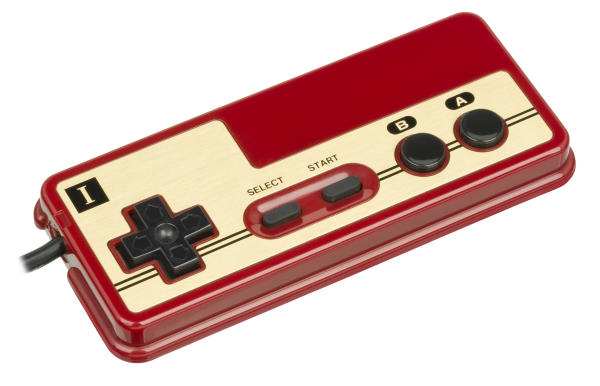
DeviceID: 0x00000001
| IOState | Actuator | Values |
|---|---|---|
| 0 | Up | 0/1 |
| 1 | Down | 0/1 |
| 2 | Left | 0/1 |
| 3 | Right | 0/1 |
| 4 | Select | 0/1 |
| 5 | Start | 0/1 |
| 6 | B | 0/1 |
| 7 | A | 0/1 |
Although Famicom controllers are not removable, they can be detached inside the case, so for the sake of code unification we will consider them removable.
Famicom Controller (Port2)
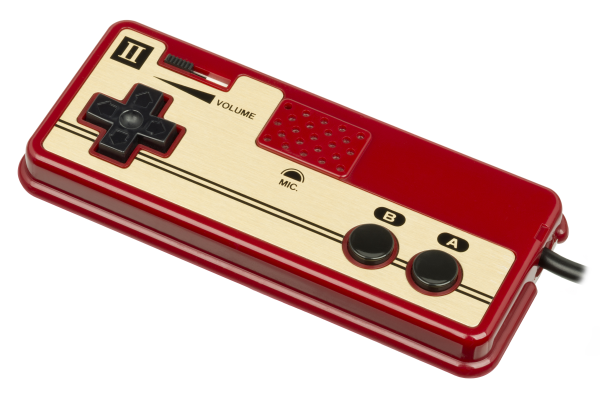
DeviceID: 0x00000002
| IOState | Actuator | Values |
|---|---|---|
| 0 | Up | 0/1 |
| 1 | Down | 0/1 |
| 2 | Left | 0/1 |
| 3 | Right | 0/1 |
| 4 | B | 0/1 |
| 5 | A | 0/1 |
| 6 | Volume | 0...255 |
| 7 | MicLevel | 0...255 |
Volume and mic level values are in the UInt8 range so far, we'll see how good this model is in the process.
NES Controller (Port1/2)
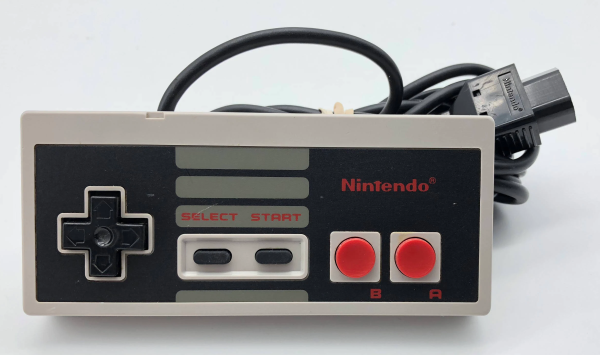
DeviceID: 0x00000003
| IOState | Actuator | Values |
|---|---|---|
| 0 | Up | 0/1 |
| 1 | Down | 0/1 |
| 2 | Left | 0/1 |
| 3 | Right | 0/1 |
| 4 | Select | 0/1 |
| 5 | Start | 0/1 |
| 6 | B | 0/1 |
| 7 | A | 0/1 |
Dendy Turbo Controller (Port1/2)
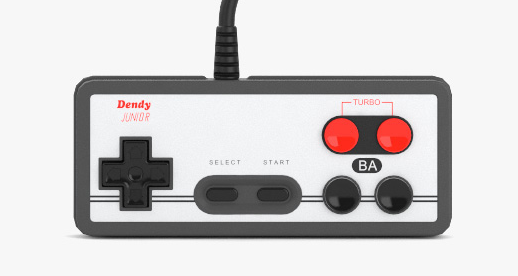
DeviceID: 0x00000004
| IOState | Actuator | Values |
|---|---|---|
| 0 | Up | 0/1 |
| 1 | Down | 0/1 |
| 2 | Left | 0/1 |
| 3 | Right | 0/1 |
| 4 | Select | 0/1 |
| 5 | Start | 0/1 |
| 6 | TurboB | 0/1 |
| 7 | TurboA | 0/1 |
| 8 | B | 0/1 |
| 9 | A | 0/1 |
Virtual Famicom Controller (Port1)
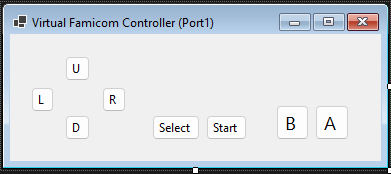
DeviceID: 0x00010001
| IOState | Actuator | Values |
|---|---|---|
| 0 | Up | 0/1 |
| 1 | Down | 0/1 |
| 2 | Left | 0/1 |
| 3 | Right | 0/1 |
| 4 | Select | 0/1 |
| 5 | Start | 0/1 |
| 6 | B | 0/1 |
| 7 | A | 0/1 |
Virtual Famicom Controller (Port2)
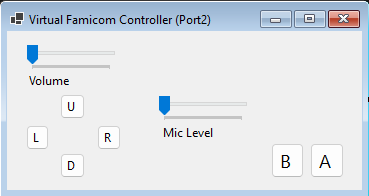
DeviceID: 0x00010002
| IOState | Actuator | Values |
|---|---|---|
| 0 | Up | 0/1 |
| 1 | Down | 0/1 |
| 2 | Left | 0/1 |
| 3 | Right | 0/1 |
| 4 | B | 0/1 |
| 5 | A | 0/1 |
| 6 | Volume | 0...255 |
| 7 | MicLevel | 0...255 |
Virtual NES Controller (Port1/2)
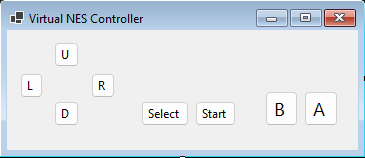
DeviceID: 0x00010003
| IOState | Actuator | Values |
|---|---|---|
| 0 | Up | 0/1 |
| 1 | Down | 0/1 |
| 2 | Left | 0/1 |
| 3 | Right | 0/1 |
| 4 | Select | 0/1 |
| 5 | Start | 0/1 |
| 6 | B | 0/1 |
| 7 | A | 0/1 |
Virtual Dendy Turbo Controller (Port1/2)
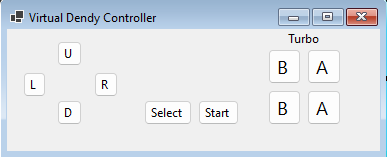
DeviceID: 0x00010004
| IOState | Actuator | Values |
|---|---|---|
| 0 | Up | 0/1 |
| 1 | Down | 0/1 |
| 2 | Left | 0/1 |
| 3 | Right | 0/1 |
| 4 | Select | 0/1 |
| 5 | Start | 0/1 |
| 6 | TurboB | 0/1 |
| 7 | TurboA | 0/1 |
| 8 | B | 0/1 |
| 9 | A | 0/1 |